
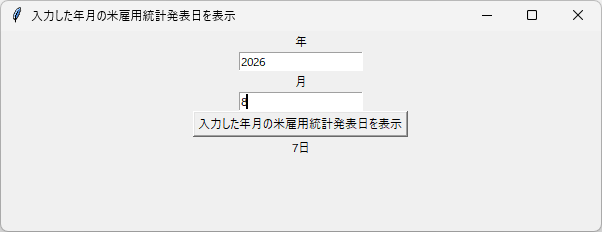
tkinter で 入力した年月の米雇用統計発表日を表示します。
2003年~2026年8月の期間を対象にしています。
- 参考記事
下記の記事で作成したプログラムを改造して作ります。

米雇用統計発表日については、下記記事にまとめています。

広告(PR)|自分の投資スタイルを見つける。※タップで開閉
広告(PR)
DMM FXは、「最初の一歩を踏み出す場」として選ばれることがある
口座を開いてみた。取引してみた。思ったよりも難しかった。──そんな経験が、投資との距離感を知るきっかけになることもあります。
サービスを通じて、自分の投資スタイルを見つける。それは、確信ではなくても構いません。「試してみた」という実感が、次の選択の材料になることもあるからです。
DMM FXに関する詳細は、以下の広告(PR)リンクをご覧いただけます。
※FXは元本保証のない金融商品です。相場変動により損失が生じる可能性がありますので、ご理解のうえでご覧ください。
👇こちらは広告(PR)リンクバナーです


※本リンクは広告収益が発生する可能性のある広告(PR)リンクです
実際に書いたコード
# 入力した年月の米雇用統計発表日を表示する
import tkinter as tk
from datetime import datetime, timedelta


def show_day():
    year = year_entry.get()
    month = month_entry.get()
    day = "12"

    # 入力が数字がどうかチェック
    if not (year.isdigit() and month.isdigit() and day.isdigit()):
        result_label.config(text="数字を入力してください")
        return

    try:
        y = int(year)
        m = int(month)
        d = int(day)

        # 入力年月の前月を参照する
        m -= 1
        if m < 1:
            m = 12
            y -= 1
        dt = datetime(y, m, d)
    except ValueError:
        result_label.config(text="存在しない年月です")
        return

    # 12日を含む週が終わってから3回目の金曜日が翌月の何日かを計算
    weekday_sunday0 = dt.isoweekday() % 7  # 日曜日=0 に変換
    friday = d + 5 - weekday_sunday0  # 12日を含む週の金曜日
    friday_3 = datetime(y, m, friday) + timedelta(
        days=21
    )  # 12日を含む週の金曜日から3週間後

    # 例外チェック
    # 2003年以降、2026年8月までを対象としています。
    # この例外は、現在内容を確認中です。参考程度にしてください。
    # 私が全ての年月で比較した上で作成した表ではなく、
    # 正確さがどの程度なのか分かっていません。
    result = friday_3
    cancel = False

    if result == datetime(2003, 7, 4):
        result = result.replace(day=3)

    if result == datetime(2008, 7, 4):
        result = result.replace(day=3)

    if result == datetime(2013, 10, 4):
        result = result.replace(day=22)

    if result == datetime(2013, 11, 1):
        result = result.replace(day=8)

    if result == datetime(2015, 7, 3):
        result = result.replace(day=2)

    if result == datetime(2020, 7, 3):
        result = result.replace(day=2)

    if result == datetime(2025, 11, 7):
        cancel = True  # 中止

    if result == datetime(2025, 12, 5):
        result = result.replace(day=16)

    if result == datetime(2026, 1, 2):
        result = result.replace(day=10)

    if result == datetime(2026, 2, 6):
        result = result.replace(day=11)

    if result == datetime(2026, 7, 3):
        result = result.replace(day=2)

    if cancel:
        result_label.config(text="中止")
    else:
        result_label.config(text=f"{result.day}日")


# --- GUI構築 ---
root = tk.Tk()
root.title("入力した年月の米雇用統計発表日を表示")
root.geometry("600x200")

tk.Label(root, text="年").pack()
year_entry = tk.Entry(root)
year_entry.pack()

tk.Label(root, text="月").pack()
month_entry = tk.Entry(root)
month_entry.pack()

tk.Button(
    root,
    text="入力した年月の米雇用統計発表日を表示",
    command=show_day,
).pack()

result_label = tk.Label(root, text="")
result_label.pack()

root.mainloop()
解説
入力年月の前月を参照
# 入力年月の前月を参照する
m -= 1
if m < 1:
    m = 12
    y -= 1
やっていることは 「月を1つ戻すだけ」 です。 雇用統計ロジックが “前月の12日を使う” 仕様なので、結局この処理が一番シンプルで壊れません。
datetime は 0 月を受け付けないため、1月だけは 12月に巻き戻して年を1つ減らしています。 関数化しようとしましたが、最終的にはこの形が一番安全でした。
例外チェック
ロジックで計算した発表日をベースにして、 過去にズレていた年月だけ if で補正しています。
2025年11月だけは発表が中止だったため、 この月は "中止" を表示するにしています。
実行結果
Auto Py to Exe で、Windowsのexeアプリ化して、実行。
HR